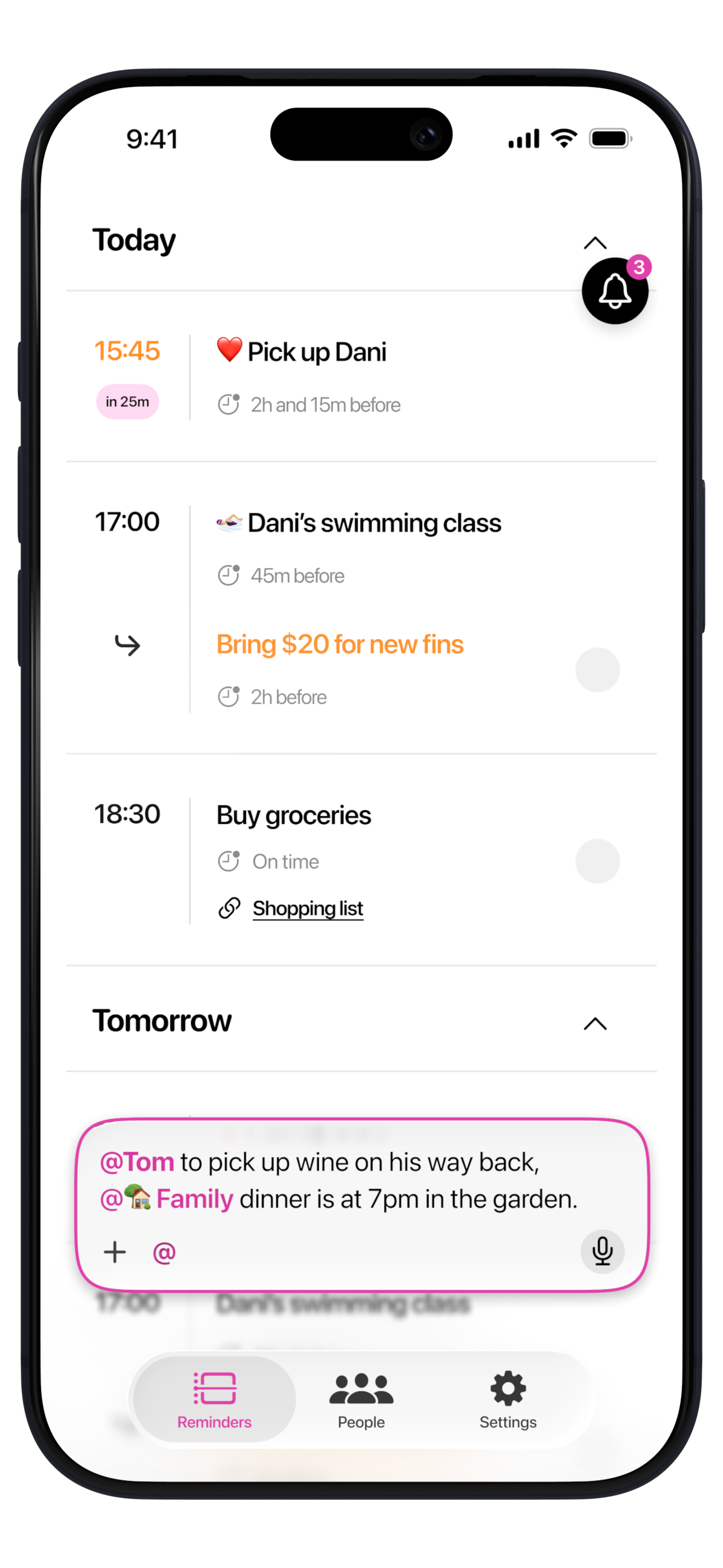
Most family apps hand everyone a shared board to open. The more useful question for a busy household is which app lets you @mention a family member so the reminder becomes theirs, on their phone, and chases it until it is done.
In most families the remembering quietly falls to one person: the permission slip, the dentist, the birthday present, the form due Friday. That invisible tracking is the mental load, and it rarely gets shared just by opening a shared app. The reassuring part is that it does not have to live in anyone's head - a well-timed reminder measurably lifts follow-through; in clinical trials, a simple text reminder roughly doubled the odds patients took their medication (Thakkar et al., JAMA Internal Medicine, 2016).
So for a household the real question is not which app has the prettiest calendar, but which one puts the right nudge on a specific member's phone at a moment they can act. Below is how the main options trade off, with honest strengths and limitations of each, for a family trying to actually share the load.
RemindMe
An AI reminder app for iPhone that thinks about what you tell it and, with an @mention, shares a reminder onto a family member's phone too - for the parent who carries the household's remembering.
Strengths
- Capture anything, any way - say it, type it, snap a photo or screenshot, or drop in a document - and the AI reads it.
- The AI actually thinks about what you tell it - it works out what each thing is and fills in what it can from common sense and what it has learned about you. Say 'before school' and it knows when the school day starts near you; give it an exact time and it uses that. It keeps learning your family's routine, so each time it needs less from you.
- It takes a village to raise a child, and RemindMe is how the village keeps up. @mention a person, or a whole group like your family, the class parents or a kids' sports team, and the reminder becomes theirs too, on their phone. Anyone in a group can add reminders for everyone, so everyone contributes and everyone remembers.
- Hands-off follow-through - deadlines surface days ahead, open tasks nudge harder as they get urgent, and a missed item quietly reschedules to a new moment you can act on, not the same time it just failed.
- Each item is tagged with a fitting emoji, so a glance sorts the day.
- Free, with generous AI limits.
Limitations
- iPhone-only today, with Android on the way - no iPad, Mac, or web yet.
Cozi
The long-running shared family-calendar incumbent - calendar, lists, meal planner and recipe box in one place, on iPhone, Android and the web. It suits a mixed-platform household that plans around a single shared calendar.
Strengths
- Genuinely cross-platform (iOS, Android, web).
- Built-in meal planner and recipe box - which reminder apps don't include.
- Colour-coded family calendar and shared lists everyone can view.
Limitations
- No standalone reminders - alerts ride calendar events (up to 3 each), and list items get none.
- No auto-nudge, and no way to push a personal reminder to a specific member's phone - everything sits on one shared board.
- No all-format capture - can't turn a voice note, photo/screenshot or document into a reminder; the only import is Max-only ($79.99/yr) email event-import, which itself can't read photos.
- No AI brain - it never works out what a task is; the 'AI' only imports emails and generates meal plans, and you fill in every date and time yourself.
- Free tier is a rolling 30-day calendar window that Gold ($39/yr) opens up; AI features are Max-only ($79.99/yr); ad-supported.
FamilyWall
A full family hub with a shared calendar, lists, chores, a private family chat, and real-time location with geofenced Place Alerts, on iPhone, Android and web. It suits families who want coordination and location in one app.
Strengths
- Real-time family location and geofenced Place Alerts - know when someone gets home.
- Broad hub: shared calendar, lists, chores, and a private family chat.
- Cross-platform across iOS, Android and web.
Limitations
- Reminders ride calendar events and lists - nothing standalone that chases a loose task.
- No personal-reminder push to a specific member's phone and no auto-nudge - everything lives on the shared hub.
- No all-format capture - no voice, photo/screenshot or document capture; the one AI feature is email-to-event.
- No AI brain - it never works out what a task is; you file every item into the calendar, lists or chores yourself, and set each date and time by hand.
- Premium is $44.99/yr (calendar sync itself is behind Premium).
TimeTree
A clean shared group calendar with a comment thread on every event, free on iPhone, Android and web. It suits a couple or group that mainly needs one calendar everyone keeps in sync.
Strengths
- Simple, well-liked shared calendar with per-event chat.
- Free photo Event Scan pulls a date out of a flyer (English and Japanese; unavailable in the EU, UK and China).
- Cross-platform across iOS, Android and web.
Limitations
- Reminders are pre-event calendar notifications only - no standalone or persistent reminders.
- No auto-nudge and no personal reminder pushed to a specific member's phone.
- Capture is photo-only and events-only - no voice or document capture, and Event Scan is limited to English/Japanese and unavailable in the EU, UK and China.
- No AI brain - Event Scan reads a flyer's date but never works out what a task is, and it doesn't fill in a missing time for you.
- Free tier is ad-supported (Premium $44.99/yr).
Apple Reminders
The free, private list app already on every iPhone, syncing across iPhone, iPad, Mac and the web. It suits an all-Apple family that just wants shared lists at no cost.
Strengths
- Free, built in, and private - encrypted through iCloud (end-to-end only with Advanced Data Protection turned on).
- Free shared lists across everyone's Apple devices.
- Syncs iPhone, iPad, Mac and web.
Limitations
- Each person sets their own alerts; a missed reminder just turns red, with no auto-reschedule or escalation.
- Reaching another person means assigning an item inside a shared list, not pushing a free-standing reminder to their phone.
- Every item is a flat reminder - Apple applies no thinking to what you jot down - it cannot tell an urgent task from a routine one or judge what needs prep, so nothing escalates or reschedules.
- No photo/screenshot or document capture, and no detail-filling - Apple Intelligence only suggests reminders from text you're already viewing and parses only the time you typed.
Side by side
| RemindMe | Cozi | FamilyWall | TimeTree | Apple Reminders | |
|---|---|---|---|---|---|
| Capture | ✓✓Type, voice, photo, docs | ✓Email import (Max only) | ✓Email-to-event only | ✓Photo scan, events only | ✓Type or Siri |
| Sharing reminders | ✓✓A person or group, on their phone and yours | ✓A shared board | ✓A shared board | ✓Shared calendar only | ✓Assign in a shared list |
| True AI brain | ✓✓Yes | ✗No | ✗No | ✗No | ✗No |
| Nudging | ✓✓Nudges & reschedules misses | ✗No task nudge | ✗No task nudge | ✗Pre-event alert only | ✗Missed just turns red |
| Platforms | iPhone (Android soon) | iOS, Android, web | iOS, Android, web | iOS, Android, web | iPhone, iPad, Mac, web |
| Price | Free, generous AI limits; premium | Free; Gold $39, Max $80/yr | Free; Premium $44.99/yr | Free with ads; Premium $45/yr | Completely free |
Which should you pick?
Pick RemindMe. It is the only one here that actually does the remembering for the whole family. Say a thing once, however it comes out, and its AI brain works out what it is, reminds you when you can act, and chases it until it is done. @mention a family member, or set up a group like your kids' soccer team, and the reminder becomes theirs too, on their phone, so everyone contributes and everyone remembers, not just one parent. The others give you a board the family has to remember to open; RemindMe takes the remembering out of one person's head.
The bottom line
The bottom line: in every family, one person ends up carrying all the remembering, and no calendar or list ever lifts it off them. RemindMe does. Capture a thought however it comes out, and its AI brain works out what it is, reminds you when you can act, and chases it until it is done. @mention a person or a whole group, and it becomes theirs too, so the family and every circle around your kids share the load instead of one person. On iPhone today, nothing else comes close.