The best reminder apps in 2026 - and how to pick the one that actually gets things done, not just holds a list.
Here is the thing worth knowing before you pick: an external reminder can roughly double whether you follow through. In a meta-analysis of 16 controlled trials, a simple text reminder more than doubled the odds that people took their medication as intended (Thakkar et al., JAMA Internal Medicine, 2016). So the real question is not which app stores the neatest list - it is which one puts the right cue in front of you at the moment you can act.
All five apps below will hold a to-do list. Where they split is how much they do with what you tell it: whether you have to file, time and chase each item yourself, or whether the app works it out, follows through, and turns an @mention into a reminder on their phone too. Here is how they compare, RemindMe first.
RemindMe
An app that thinks about what you tell it and follows through - for anyone who would rather say a thing once and trust it is handled.
Strengths
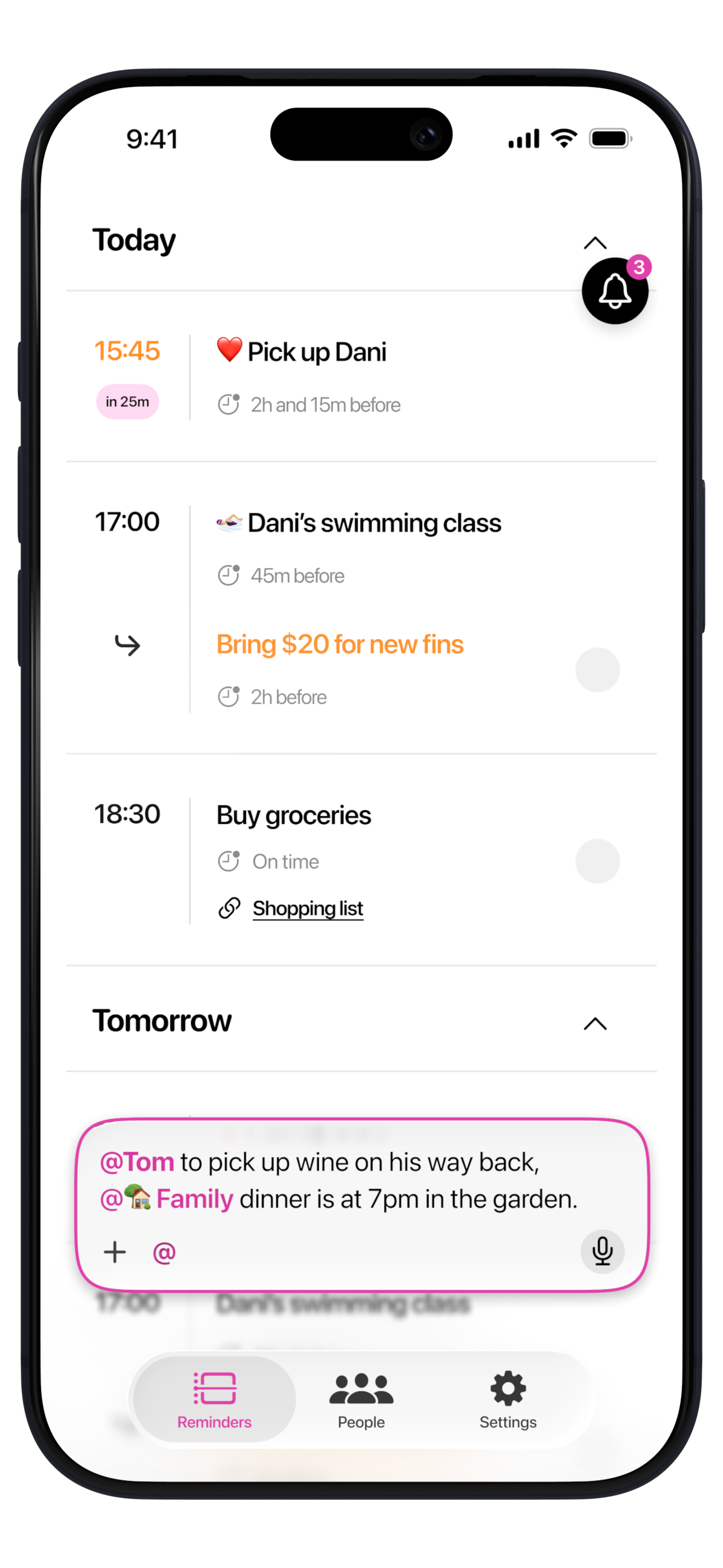
- Empty your head however it comes out - say it in any language, type it, snap a photo or a screenshot, or send a document - and one messy sentence comes back as separate reminders.
- The AI actually thinks about what you tell it - it works out what each thing is, so there is nothing to sort, tag or file, and fills in what it can from common sense, what it has learned about you, and how things work where you live. Say 'before school' and it knows when the school day starts near you; give it an exact time and it uses that. It keeps learning your people and preferences, so each time it needs less from you.
- It follows through so you do not have to - deadlines surface days ahead, open tasks nudge harder the more urgent they get, and anything you miss quietly reschedules to a new when-you-can-act time instead of sitting red on a list.
- @mention a person or a group and the reminder becomes theirs too, on their phone. In a group like 'Family' or a sports group, anyone can add reminders for everyone, so remembering is shared, not one person's job.
- It tags each item with a fitting emoji, so your day reads at a glance instead of a wall of grey text.
- Free, with generous AI limits.
Limitations
- iPhone-only today - Android is coming, but there is no iPad, Mac or web app yet.
Apple Reminders
The free reminders app already on every iPhone - the zero-setup default for anyone who lives entirely in Apple's world.
Strengths
- Free and already there - built into every iPhone, iPad and Mac, syncing over iCloud with nothing to install, and reachable on the web.
- Genuinely private - iCloud-encrypted, and fully end-to-end if you switch on Advanced Data Protection, with free shared lists.
- Native across Apple - deep Siri and system integration, plus a light Apple Intelligence touch that can suggest a reminder from something you are reading.
Limitations
- No photo or document capture - Siri and Apple Intelligence handle typed and spoken input, but it can't read a photo, screenshot or PDF into a structured reminder.
- No AI brain for the task - it parses your words and auto-sorts reminders, but works out what each thing really is, fills in a time you leave out, or reschedules a miss; a missed one just turns red.
- Sharing is list-based - you assign inside a shared list and each person sets their own alerts; it does not push a reminder onto someone else's phone.
Google Tasks
A free, lightweight task list wired into Gmail and Google Calendar - a natural fit if your day already runs inside Google Workspace.
Strengths
- Free and woven into Google - tasks sit right inside Gmail and Google Calendar, on Android, iPhone and the web.
- Quick AI capture - Gemini can take a voice note or a photo of a handwritten list and turn it into tasks.
Limitations
- No AI brain, and no real reminder - Gemini can capture a task, but nothing works out what it is or fills in a time; it is just a to-do entry you set yourself, with no item types or nudging.
- Dropped location reminders - the 2025 move from Keep into Tasks removed location-based reminders.
- Weak sharing - it cannot push a reminder onto another person's phone.
Todoist
A powerful, cross-platform task manager for people who think in projects and labels and want a structured place to organize everything.
Strengths
- Truly cross-platform - iPhone, Android, Mac, Windows and the web, all in sync.
- Deep organization - projects, labels, filters and saved views to structure everything exactly how you want.
- AI helpers for input - Ramble turns a voice note into tasks, it reads photos and PDFs into tasks, and Smart Schedule suggests dates for a pile of overdue work.
- Basic task reminders are now free.
Limitations
- AI helpers, but no AI brain - it never works out what your task is or fills in a time; Smart Schedule only suggests dates you confirm, you file everything into projects yourself, and overdue tasks pile up with no auto-reschedule.
- The best parts are gated - custom-offset and location reminders and unlimited AI sit behind Pro ($60/year).
- Sharing means adding someone as an assignee in a shared project they must join - there's no by-name @mention or group where anyone reminds everyone.
Any.do
A polished cross-platform to-do list, calendar and daily planner for people who want one tidy place to lay out their day.
Strengths
- Cross-platform and well designed - a to-do list, calendar and 'Moment' daily planner across iPhone, Android and desktop.
- Standalone reminders - one-time and basic recurring reminders are free.
Limitations
- No AI brain - 'Any.do AI' (paid) fills in lists and subtasks, but it never works out what a task is or fills in a time you leave out.
- Photos aren't turned into tasks - unlike an app that reads a screenshot or document, a photo you send isn't parsed into structured reminders.
- Almost everything useful is paid - advanced and location reminders, WhatsApp capture and AI need Premium (~$60/year), and Family is ~$100/year.
- All sharing is paid, and it shares lists and boards - it doesn't push a personal reminder onto a specific phone as that person's own.
Side by side
| RemindMe | Apple Reminders | Google Tasks | Todoist | Any.do | |
|---|---|---|---|---|---|
| Capture | ✓✓Type, voice, photo, docs | ✓Type or Siri | ✓Type or voice | ✓✓Type, voice, photo, PDF | ✓Type; images attach |
| Sharing reminders | ✓✓A person or group, on their phone and yours | ✓Shared list, own alerts | ✗Can't push to a phone | ✓Assign in a shared project | ✓Assign in a space (paid) |
| True AI brain | ✓✓Yes | ✗No | ✗No | ✗No | ✗No |
| Nudging | ✓✓Nudges & reschedules misses | ✗Goes red and sits | ✗No nudge | ✗Overdue piles up | ✗No nudge |
| Platforms | iPhone (Android soon) | iPhone, iPad, Mac, web | Android, iPhone, web | Every platform | Every platform |
| Price | Free, generous AI limits; premium | Free | Free | Free; Pro $60/yr | Free; Premium for more |
Which should you pick?
Pick RemindMe. It is the one app here that does the thinking - take any thought, however it comes out, and it works out what each thing is and fills in the details you left out, then chases it until it is done. @mention a person or a group and the reminder becomes theirs too, set on their phone. The others are good at holding a list; RemindMe is built to make the list actually happen. The only real reason to wait is platform: it is iPhone-only for now, so if the people you share with are split across Android, a cross-platform option will suit you better in the meantime. For everyone on iPhone, RemindMe is the one that actually does the remembering.
The bottom line
Every app here will hold a list, and the cross-platform ones sync and organize beautifully. But a reminder only changes what gets done when it lands in front of you at the moment you can act - and that is the part RemindMe owns: it works out what each thing is, follows through until it is done, and - with an @mention - shares the reminder onto both phones. It is iPhone-only for now. If you want a place to organize across every device, one of the rivals will suit you better. If you want the app to do the remembering, RemindMe is the one built for it.